AI Voicemail Generator Free
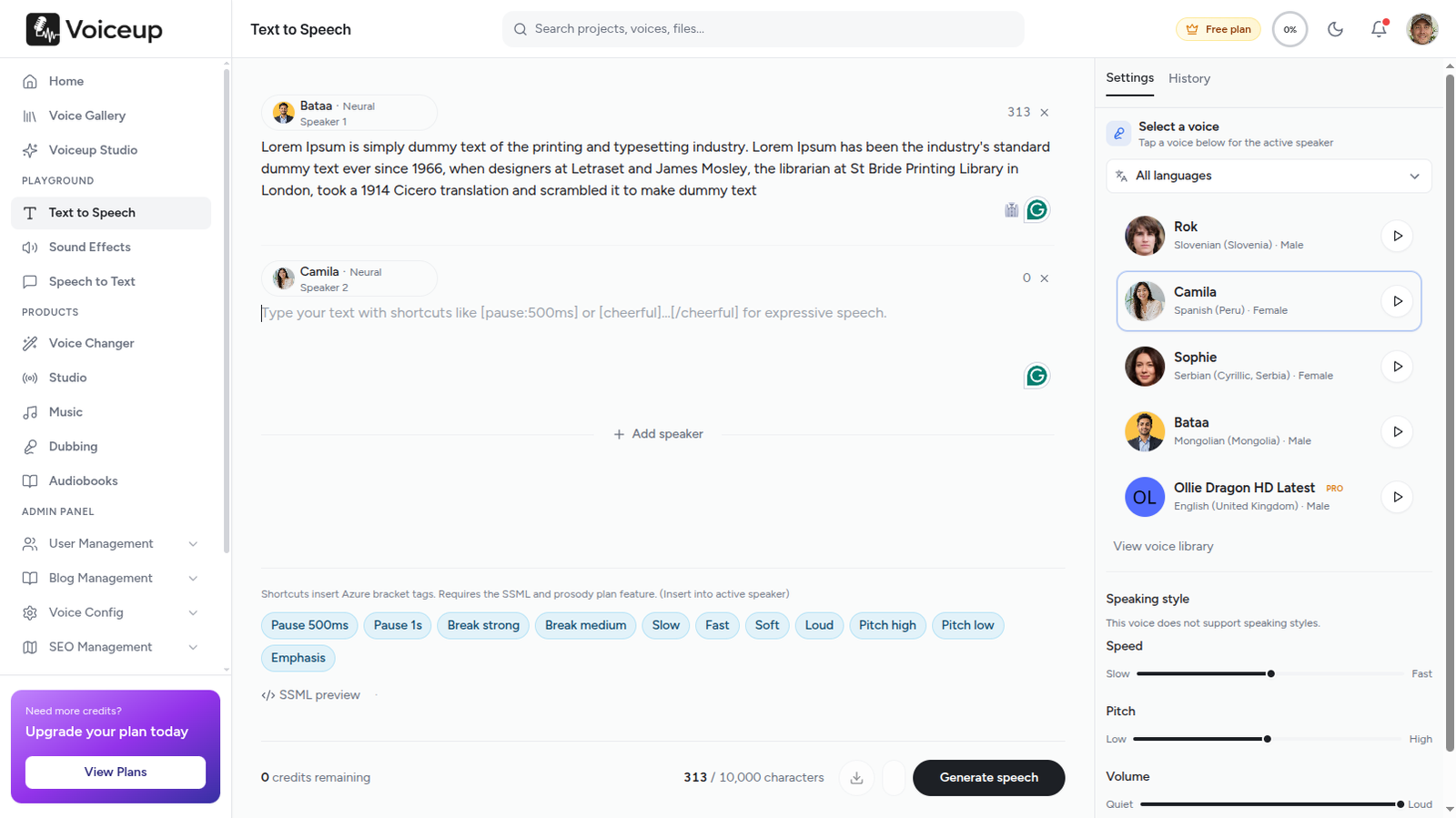
Type your greeting, pick a professional voice, download MP3. Works with every phone system — business hours, after-hours, holiday, and personal lines.
 Voicemail
MP3 export
Voicemail
MP3 export
Type your greeting, pick a professional voice, upload to any phone system
By the numbers
A muffled self-recording costs credibility. A crisp AI greeting sounds like you hired a studio — in under 60 seconds.
30s
Typical greeting
MP3
Universal format
5,000
Free on signup
Why AI voicemail matters
Every missed call lands on your voicemail. A muffled self-recording, background noise, or an outdated message tells callers you are not paying attention. A crisp, professional AI voicemail greeting does the opposite — it builds trust before you ever pick up the phone.
With a free AI voicemail generator, you type your script once, pick a natural voice, and download MP3 audio that works on RingCentral, Zoom Phone, iPhone, Android, and every major VoIP platform. Update hours, promotions, or holiday closures in under a minute — no recording booth required.
Old way vs Voiceup
Complete guide
A strong AI voicemail greeting follows a simple formula: identify yourself and your business, explain why you cannot answer, set expectations for a callback, and offer an alternate contact for urgent matters. Keep it between 15 and 30 seconds — long enough to be helpful, short enough that callers do not hang up.
Voiceup's AI voicemail generator handles pacing automatically so your greeting sounds natural — not rushed like a self-recording made in a noisy office.
Write or paste your voicemail script into Voiceup. Choose a voice that matches your brand — warm and approachable for small businesses, authoritative for law firms, energetic for agencies. Preview the audio, adjust SSML pauses if needed, then download MP3 or WAV.
Upload the file to your phone system: RingCentral and Zoom Phone accept direct MP3 uploads in admin settings. For iPhone and Android, play the MP3 near the mic during custom greeting setup, or use your carrier's voicemail app import feature. Test by calling your own line — listen for clarity, volume, and pacing before going live.
Generate separate greetings for business hours, after-hours, holidays, and out-of-office periods. Swap MP3 files on your VoIP dashboard in under a minute when schedules change — no re-recording required.
Solo entrepreneurs, small business owners, sales teams, medical offices, law firms, real estate agents, and remote teams all use AI voicemail to sound professional without studio costs. Multi-location businesses generate consistent greetings across every branch line using the same voice and brand tone.
Download MP3 greetings that work on RingCentral, Zoom Phone, Dialpad, 8x8, Google Voice, Microsoft Teams Phone, iPhone, Android, and standard carrier voicemail. One script, one voice, every line — upload once and sound professional everywhere.
Spin seasonal, holiday, and OOO greetings without re-entering a recording booth.
Same professional tone across sales, support, and executive lines.
Edit your script and download a new greeting in under 60 seconds.
American, British, formal, or casual — preview before you commit.
Use generated greetings on any business line without licensing headaches.
| Method | Cost | Speed | Best for |
|---|---|---|---|
| Voiceup AI voicemail | 5,000 chars free on signup | Under 60 seconds | Business lines, teams, frequent updates |
| Self-recording | Free + time | 30–60 min with retakes | Personal lines, one-time setup |
| Professional voice talent | $150–300 per greeting | Days–weeks | Flagship brand campaigns |
| Default carrier greeting | Free | Instant | Lines where professionalism does not matter |
Why this fits
Paste your greeting text — business name, hours, callback promise — and generate studio-quality audio instantly.
American, British, casual, or formal — browse 600+ voices in 150+ languages. Preview before download.
Spin seasonal greetings and OOO messages without re-entering a recording booth.
Same professional tone across sales, support, and executive lines — brand voice at scale.
Upload to RingCentral, Zoom Phone, Google Voice, iPhone, or Android custom greeting settings.
Use generated greetings on any business or personal line without licensing headaches.
Workflow
The exact steps creators in this space follow with Voiceup — copy them on day one.
Use our templates below or bring your own — keep it under 30 seconds for best results.
Formal for law firms, warm for clinics, energetic for agencies — preview before download.
Adjust pacing with SSML pauses. Regenerate until it sounds exactly right.
MP3 works everywhere. Swap greetings when hours or promotions change.
Voice picks
Suggestions based on what teams in this space actually pick — start here, then explore the full library.
Sarah Mitchell
Professional receptionist
James Park
Corporate executive
Emma Collins
Friendly small business
Browse the full voice library inside the studio. Open Voiceup
In the wild
"You've reached Acme Corp. Our office is open Monday through Friday, 9 to 5…"
Let callers know when you'll return and offer an emergency contact or website.
Seasonal closures and out-of-office without awkward self-recordings in a hotel room.
Sales, support, and billing lines each get a tailored greeting in the same brand voice.
Copy-paste starters
Paste any template into Voiceup, swap bracketed placeholders, pick a voice, and download your greeting in seconds.
"Thank you for calling [Company Name]. You've reached [Your Name]. I'm unable to take your call right now. Please leave your name, number, and a brief message, and I'll return your call within one business day."
"You've reached [Company Name]. Our office is currently closed. Our business hours are Monday through Friday, 9 AM to 5 PM. Please leave a message and we'll get back to you on the next business day."
"Hi, this is [Your Name]. I'm out of the office until [Date] with limited access to email. For urgent matters, please contact [Colleague] at [Number]. Otherwise, leave a message and I'll respond when I return."
"Happy holidays from [Company Name]. Our office is closed for the holiday season and will reopen on [Date]. For immediate assistance, visit [Website]. Leave a message and we'll respond when we're back."
"You've reached the sales team at [Company Name]. We're helping other customers right now. Leave your name, company, and best callback number, and a representative will reach out within two business hours."
"Thank you for calling [Company Name] support. All agents are currently assisting other customers. Please leave your account number, a brief description of your issue, and a callback number. We'll respond as soon as possible."
"You've reached [Practice Name]. Our office is currently closed. If this is a medical emergency, please hang up and dial 911. For appointment requests, leave your name and callback number and we'll return your call during business hours."
"Hi, you've reached [Your Name] with [Brokerage]. I'm showing properties or with a client and can't take your call. Leave your name, number, and property address, and I'll get back to you within the hour."
FAQ
Try the workflow
Open the studio, paste your script, and listen. The fastest test is your own ears.
No credit card required · Cancel anytime


Keizersgracht, Amsterdam, Netherlands
Voiceup is subscription-based AI text-to-speech software for creators, educators, and teams. Convert text into natural narration using licensed synthetic voices for learning, productivity, and accessibility.
This platform does not provide voice cloning, impersonation, celebrity voice replication, deepfake audio, NSFW generation, or tools intended to infringe third-party rights.
Copyright 2020-2026. All Rights Reserved Voiceup