Make Audiobook from Notes Free
Turn lecture outlines, study guides, and draft chapters into professional narration. Paste your notes, pick a voice, download MP3 — study on your commute instead of re-reading screens.
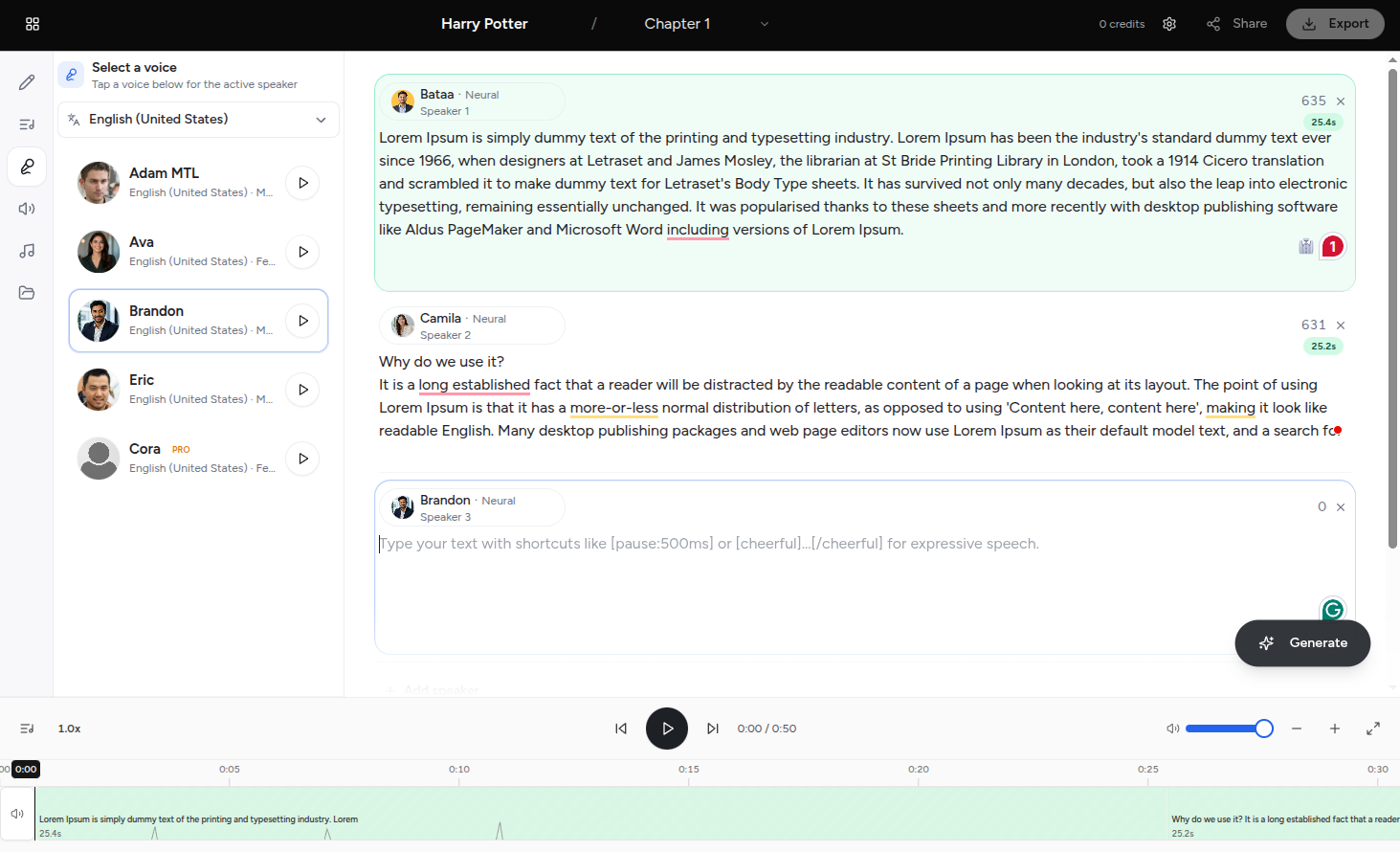 Audiobook Studio
Notes → MP3
Audiobook Studio
Notes → MP3
Paste lecture notes, pick a narrator, export listenable chapters
Why notes-to-audiobook matters
Students, researchers, and indie authors sit on dense written material every day: lecture outlines, chapter drafts, study guides, and research summaries. Reading on a screen works at a desk. It fails on a commute, at the gym, or when your eyes are tired before an exam.
Converting notes to audiobook format with AI text-to-speech closes that gap. You are not starting from zero — the content exists. Voiceup adds natural narration, consistent pacing, and MP3 exports you can listen to anywhere.
Old way vs Voiceup
Complete guide
Lecture outlines, Cornell notes, chapter summaries, bullet-point study guides, and full manuscript drafts all work. The key is clean text — TTS reads exactly what you paste, including stray page numbers and citation brackets.
Clean your source text first. Remove headers, footers, and "continued on next page" artifacts. Insert blank lines between sections so you can generate one MP3 per chapter. Paste into Voiceup, choose from 600+ voices in 150+ languages, preview with a warm narrator for fiction or a measured voice for textbooks, then download.
Your free signup includes 5,000 characters — enough for a solid study chapter or lecture outline. For longer works, split notes into chunks and reuse the same voice every time. Pro plans unlock higher limits. Merge chapters in Audacity (free), GarageBand, or Reaper.
University students convert missed-lecture outlines before exams. PhD researchers listen to literature review drafts to catch awkward phrasing. Indie authors hear manuscripts read aloud before publishing. HR teams turn policy documents into listenable onboarding audio for remote employees.
Split long notes into sections, generate one MP3 per chapter, and keep the same narrator voice across every file. Your audiobook sounds unified from intro to appendix — not like six different readers.
Convert professor outlines into a review audiobook you can loop before finals.
Hear awkward phrasing read aloud — catch issues your eyes skip on screen.
Support auditory learners and dyslexic students with listenable study material.
Turn SOP docs into onboarding audio for distributed teams.
Convert notes in English, Spanish, Hindi, Arabic, and 150+ more — same workflow, native pronunciation.
| Method | Cost | Speed | Best for |
|---|---|---|---|
| Voiceup AI TTS | 5,000 chars free on signup | Minutes per chapter | Students, indie authors, drafts |
| Human narrator (ACX) | $200–400/hr finished | Weeks–months | Flagship commercial releases |
| Self-recording | Free + mic/time | Hours per chapter | Personal memoir, rough drafts |
| Read on screen only | Free | Instant | Short notes at a desk |
By the numbers
Students, authors, and researchers use Voiceup to convert written material into audio they can listen to anywhere.
5,000
Free chars on signup
600+
AI voices
150+
Languages
Why this fits
Outlines, bullet notes, full chapters, or exported Google Docs — paste and generate.
Convert dense material into audio for walks, drives, and gym sessions.
Lock one narrator across every chunk so your audiobook sounds unified.
SSML pauses between sections mirror natural chapter breaks and study rhythm.
Auditory learners and dyslexic students absorb content faster when they can listen.
A human narrator runs $200–400 per finished hour. Voiceup covers drafts, study aids, and indie publishing.
Workflow
The exact steps creators in this space follow with Voiceup — copy them on day one.
Remove page numbers, headers, and stray formatting. Add blank lines between chapters.
Start with 5,000 free characters on signup. Split longer notes into chapter chunks as needed.
Browse 600+ voices in 150+ languages — warm storytelling or clear textbook delivery.
Download MP3s per chapter. Merge in Audacity or import to Apple Books / Spotify.
Voice picks
Suggestions from our 600+ voice library — start here, then explore 150+ languages in the studio.
Marcus Cole
Non-fiction narrator
Elena Vasquez
Textbook & study guide
Liam O'Brien
Story & fiction notes
Browse all 600+ voices in the studio. Open Voiceup
In the wild
Recordings missed? Convert professor outlines into a review audiobook before exams.
Hear your manuscript read aloud to catch awkward phrasing before publishing.
Turn SOP documents into listenable onboarding audio for remote teams.
Listen to translated notes and vocabulary lists with native pronunciation.
Follow this checklist before you paste — it saves regeneration time and makes narration sound professional.
Remove page numbers, footers, citation brackets, and "continued on next page" artifacts. TTS reads every character literally — including stray HTML tags from copy-paste.
Insert a blank line or heading before each new section. Generate one MP3 per chapter for easier navigation, editing, and Apple Books chapter markers.
Write "for example" instead of "e.g.", spell out "United States" instead of "US", and expand acronyms on first use for smoother narration.
Generate a 500-word sample before committing to a full chapter. Adjust voice, speed, and SSML pauses based on what you hear — not what you assume.
Save the same voice selection for every chapter chunk. Consistency is what separates "study audio" from something that sounds like a real audiobook.
Combine MP3s in Audacity or GarageBand. Add 1–2 seconds of silence between chapters. Normalize volume so early and late chapters match.
FAQ
Try the workflow
Open the studio, paste your script, and listen. The fastest test is your own ears.
No credit card required · Cancel anytime

Keizersgracht, Amsterdam, Netherlands
Voiceup is subscription-based AI text-to-speech software for creators, educators, and teams. Convert text into natural narration using licensed synthetic voices for learning, productivity, and accessibility.
This platform does not provide voice cloning, impersonation, celebrity voice replication, deepfake audio, NSFW generation, or tools intended to infringe third-party rights.
Copyright 2020-2026. All Rights Reserved Voiceup